Designing with the Symphony Color Font
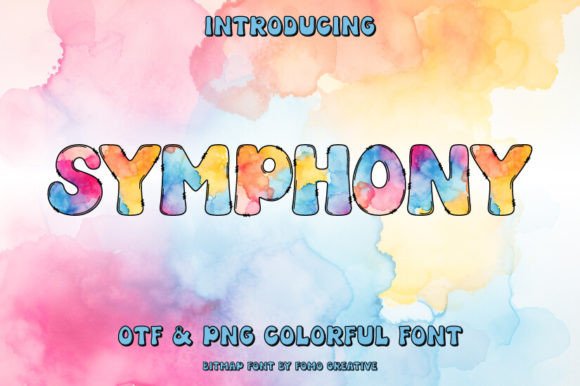
In the crowded world of digital assets, finding a typeface that doesn’t just sit on the page but demands attention is rare. Symphony is one of those rare finds. It isn’t merely a collection of letters; it is a visual experience, leveraging the power of OpenType-SVG technology to bring depth, texture, and color directly into your typography. For designers and creators, this represents a shift from standard text layout to integrated visual artistry. Symphony is a color font, which means the characters arrive pre-rendered with gradients, shadows, and multi-dimensional effects that traditional flat fonts simply cannot achieve.
The Visual Character of Symphony
Understanding the personality of Symphony is key to using it effectively. Unlike a standard serif font or a clean sans serif font, Symphony is built to be the focal point of a design. Its visual characteristics are defined by rich, embedded color data—often featuring complex gradients and lighting effects that mimic 3D depth or metallic sheens. This is the essence of modern typography meeting graphic illustration. The "ink" isn't monochromatic; it interacts with the background, creating a dynamic feel that ranges from energetic and bold to sophisticated and luxurious.
Because it is a display font, Symphony has a strong voice. It is not designed for long-form body text, where readability at small sizes is paramount. Instead, it excels in headlines, hero text, and titles where the goal is immediate impact. The style of Symphony suggests a blend of artistic flair and technical precision, making it an ideal candidate for projects that need to feel premium and contemporary without losing a sense of warmth.
Strategic Applications: Where Symphony Shines
When incorporating a creative font like Symphony into your workflow, context is everything. The complexity of the color data means it works best in environments that support high-fidelity rendering. Here is how different professionals can leverage this typeface:
Branding and Logo Design
For entrepreneurs and small business owners, a logo design is often the first handshake with a customer. Symphony offers a shortcut to a high-end look. Because the font already contains color and texture, you can create a striking logomark without needing to manually apply gradients and shadows in Adobe Illustrator. It is particularly effective for lifestyle brands, boutique agencies, or entertainment companies that want to convey creativity and modernity. However, remember that a logo must be versatile; while Symphony makes a beautiful primary mark, ensure you have a simplified version for situations where color printing isn't possible.
Digital Presence and Social Media
In the realm of web design and social media graphics, scroll-stopping power is currency. Symphony is a powerhouse for Instagram quotes, Pinterest pins, and YouTube thumbnails. On screens, where color reproduction is vibrant, the font’s gradients and shadows pop with clarity. It allows content creators to produce visual hierarchy instantly—your headline doesn't just sit on top of the image; it feels integrated into the scene. This helps in building a consistent brand identity that followers can recognize immediately, even before reading the text.
Publishing and Editorial Design
For publishers and bloggers, typography sets the mood. Symphony is an excellent choice for magazine covers, book titles, or chapter headings in editorial design. It adds a layer of polish that elevates the perceived value of the publication. Imagine a cookbook cover or a travel magazine where the title text reflects the vibrancy of the subject matter—Symphony makes that possible without complex post-processing.
Technical Mastery and Workflow Integration
Adopting a premium font like Symphony requires a bit of technical awareness to ensure a smooth creative process. It is vital to understand the file format: Symphony is an OpenType-SVG font. This means the vector outlines are filled with bitmap data (the color information).
This product includes OTF and/or TTF files. A critical point for crafters and makers: these files are not compatible with Cricut machines. Cricut Design Space does not currently support the color data within OpenType-SVG fonts, which can lead to missing layers or rendering errors. Symphony is, however, fully compatible with professional design software including PhotoShop, Illustrator, Silhouette, and Inkscape.
When working in Photoshop or Illustrator, you treat Symphony like any other font. You select it from the type menu and type your words. The "magic" happens automatically. However, because the characters are essentially high-resolution images wrapped in a font shell, you cannot edit the internal colors of the letters easily. You are choosing the "painting" as it was designed. This makes the selection process crucial—you must evaluate the specific color palette of the font against your project's background to ensure there is enough contrast for readability.
Pairing and Design Hierarchy
One of the most common questions regarding modern typography is how to pair a complex display font with other typefaces. Because Symphony is visually dense and detailed, it pairs best with simple, neutral companions.
- With Sans Serif Fonts: Pairing Symphony with a geometric sans serif font (like Montserrat or Lato) creates a beautiful balance. The clean lines of the sans serif allow the intricate details of Symphony to breathe. Use the sans serif for sub-headers and body copy.
- With Serif Fonts: If you want a more editorial or luxurious vibe, try pairing it with a transitional serif font. This works well for wedding invitations or high-end product packaging.
- With Script Fonts: While you can pair it with a script font or handwritten font, be cautious. Both styles are competing for attention. Only do this if the script font is very light and airy, allowing Symphony to remain the star.
Evaluating Fit and Licensing
Before finalizing your design, it is essential to evaluate the fit. Does the font's inherent color match your brand's palette? If your brand is strictly blue and green, but Symphony is a warm red gradient, it may create a disconnect unless used as an accent. Always test the font on your specific background colors. Dark backgrounds often make color fonts like Symphony pop significantly more than white backgrounds, as the shadows and gradients have a canvas to rest upon.
Furthermore, as a commercial font, you must ensure your license covers your intended use. Whether you are creating physical products like printed merchandise or digital products like website headers, verify that your license permits the specific output. Most design assets come with a standard license that covers typical business use, but mass production often requires an extended license.
Symphony is more than just a typeface; it is a design asset that bridges the gap between typography and illustration. By understanding its technical requirements and stylistic strengths, you can use it to inject energy, professionalism, and a distinct artistic voice into your next project.